What a VPN Actually Does
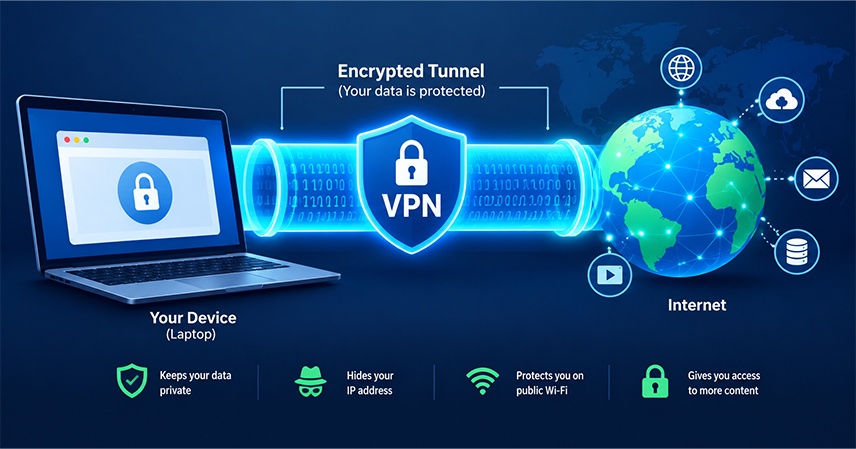
What is a VPN? A VPN (Virtual Private Network) creates a private, encrypted tunnel between your device and the internet. Instead of your data traveling in the open, where your internet service provider, network administrator, or anyone monitoring the connection could potentially see it, that traffic is scrambled and routed through a secure server before it reaches its destination. To outside observers, the traffic looks like meaningless code. To your device and the VPN server, it looks like a normal, readable connection.
This matters more than it might seem. Every website visited, every app opened, and every file downloaded creates a trail of data. Without protection, that trail can be logged, sold, or exploited. A VPN does not erase that trail entirely, but it makes it far harder for anyone outside the connection to read or intercept it.
How a VPN Works, in Plain Terms
When a VPN is switched on, three things happen in quick succession. First, the VPN app on your device establishes a secure connection with a VPN server, often located in a different city or country. Second, your internet traffic is encrypted before it leaves your device, turning readable data into unreadable code. Third, that encrypted traffic travels through the VPN server before reaching the website or service being visited, so the site sees the VPN server’s address instead of your own.
This is also where your operating system comes in. Your operating system already manages network connections behind the scenes, deciding how your device communicates with routers, servers, and the wider internet, so it helps to have a working understanding of what is happening at that lower level before adding an extra layer like a VPN on top of it.
Why Online Privacy Matters Beyond “Having Nothing to Hide”
The common objection to privacy tools is that they only matter for people who are doing something wrong. That reasoning does not hold up well once you consider what is actually at stake. Internet service providers can legally log and sell browsing habits in many regions. Advertisers build detailed profiles from browsing history, location data, and app usage. Public Wi-Fi networks, such as those found in coffee shops, airports, and hotels, are often unsecured, allowing anyone on the same network to intercept unencrypted traffic.
None of this requires wrongdoing to become a problem. A medical search, a banking session, or a private message sent over public Wi-Fi can all be exposed without a second layer of protection. Privacy, in this context, is less about hiding something and more about controlling who gets to see ordinary, everyday activity.
Common Myths About VPNs
A few misconceptions tend to follow VPNs around, and clearing them up early makes the rest of this guide easier to apply.
- A VPN makes you completely anonymous. It hides your IP address and encrypts your traffic, but it does not erase cookies, account logins, or browser fingerprinting.
- Free VPNs are just as good as paid ones. Many free VPN services generate revenue by logging and selling user data, which defeats the purpose of using one in the first place.
- VPNs slow the internet down too much to be practical. Speed loss is usually minor with a well-configured, reputable service, especially on modern connections.
- A VPN protects against viruses and malware. It secures the connection itself, not the files or downloads passing through it, so antivirus software still matters.
Where a VPN Actually Helps
VPNs are useful across a wider range of everyday situations than most people realize.
- Public Wi-Fi protection: encrypts traffic on unsecured networks in cafes, airports, and hotels, preventing others on the same network from intercepting data.
- Remote work security gives employees a secure way to access company systems and files from outside the office network.
- ISP tracking prevention: limits what an internet provider can see and log about browsing habits.
- Regional access: allows access to content or services that are region-restricted, though this depends on the terms of service of the platform being accessed.
- Safer online banking and shopping: adds a layer of encryption when handling sensitive financial information on unfamiliar or public networks.
How to Choose a Trustworthy VPN
Not all VPN providers offer the same level of protection, and choosing one deserves the same scrutiny as choosing any other software that handles sensitive data.
- Look for a clear, independently audited no-logs policy rather than a vague privacy promise.
- Check where the company is legally based, since some countries require data retention by law.
- Confirm the service uses modern encryption standards and offers a kill switch that cuts internet access if the VPN connection drops.
- Read recent, independent reviews rather than relying only on the provider’s own marketing claims.
- Avoid free VPN services for anything involving sensitive accounts or financial information.
Steps to Set Up and Use a VPN Safely
- Research providers using independent audits and reviews rather than sponsored content, and shortlist two or three options that fit your budget and device needs.
- Install the official app directly from the provider’s website or a trusted app store, and avoid third-party download links.
- Enable the kill switch setting so your connection drops entirely rather than falling back to an unprotected one if the VPN disconnects.
- Turn the VPN on before connecting to public Wi-Fi, not after, so no unencrypted traffic slips through in the meantime.
- Pair the VPN with other basic protections, such as strong, unique passwords and two-factor authentication, so a single tool is not carrying the full weight of your security.
- Periodically test the connection using an IP-checking site to confirm the VPN is actually masking your address as expected.
What a VPN Won’t Protect You From
It’s worth being direct about the limits here, because overselling a VPN’s protection can lead to a false sense of security. A VPN will not stop phishing emails from reaching an inbox, will not prevent malware from running once a bad file is downloaded, and will not protect accounts that reuse weak or repeated passwords. It also does nothing to protect data already stored elsewhere; anything kept in cloud storage, for example, depends on that service’s own encryption and access controls rather than the VPN itself. A VPN protects the connection in transit, not the security decisions made before or after that connection.
Bringing It Together
A VPN is not a single fix for online privacy, but it is one of the more accessible pieces of a larger habit of protecting personal data. Used alongside strong passwords, two-factor authentication, and a basic understanding of how your device and operating system handle network traffic, it closes one of the more common gaps that public networks and data brokers rely on. The goal is not perfect anonymity, which is difficult for anyone to achieve online. The goal is making ordinary, everyday activity harder to intercept, log, and exploit than it would be otherwise.