The recent breach involving Vercel has been widely labeled an “AI hack.” That framing is catchy but misleading. This wasn’t a case of artificial intelligence going rogue. Instead, it exposed something far more important.
The growing security risks of AI integrations, OAuth permissions, and modern developer workflows.
OAuth is a process that verifies your identity. OAuth does involve your identity, but its purpose is to grant permission to seamlessly connect to you with different apps and services without requiring you to create a new account.
If you deploy or use AI tools, this incident is worth understanding. Simply put, Vercel AI hack demystified for non-techies and beginners.
What Is Vercel?
Vercel is a platform developers use to deploy modern web apps quickly, especially frontend apps built with frameworks like Next.js. They also provide tools for building AI-powered applications, like chatbots and AI assistants.
Next.js is an open-source web development framework built on top of React that enables one to create high-performance, full-stack web applications (full-stack meaning, both frontend and backend of applications).
What Actually Happened
Let’s break it down step by step.
- The Entry Point Was a Third-Party AI Tool: The breach didn’t start at Vercel. It started with a third-party AI platform called Context.ai, which was compromised by attackers. This is known as a supply chain attack, where hackers target a smaller, connected service to reach a larger one.
- An Employee Granted Broad Access: A Vercel employee used “Sign in with Google” to connect their work account to the AI tool. During that process, they granted full OAuth permissions, essentially giving the tool access to: Emails, Files, Internal systems, and potentially other connected services. This level of access is common, but risky.
- Attackers Reused That Access: Once Context.ai was compromised, attackers leveraged the existing permissions to: Take over the employee’s account and move laterally into Vercel’s internal systems. This wasn’t a brute-force hack. It was legitimate access used maliciously.
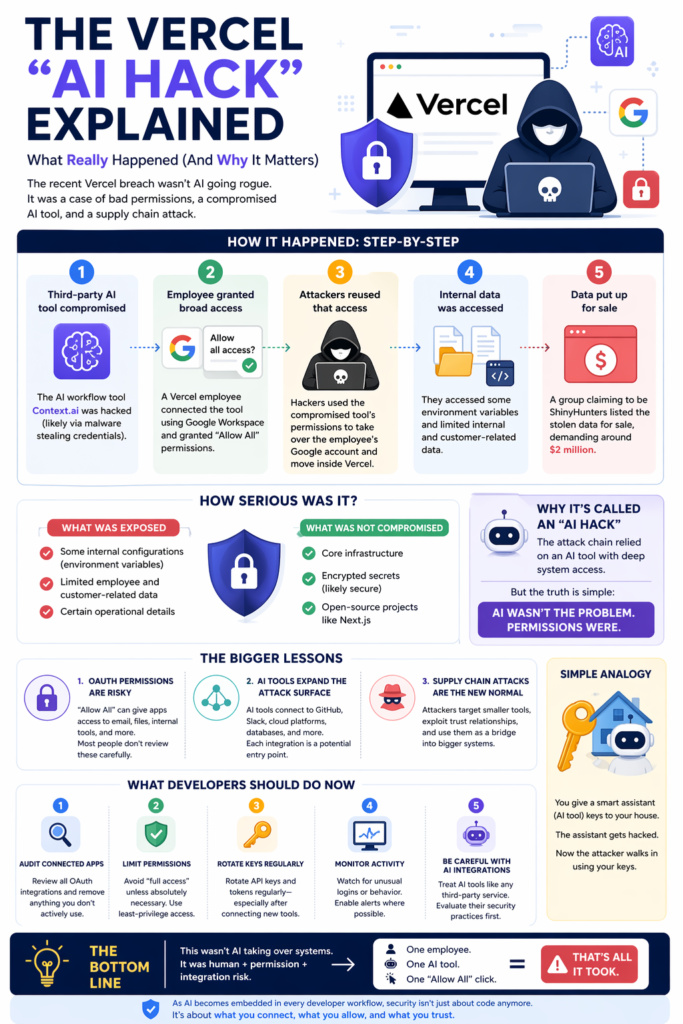
4. Internal Data Was Accessed: The attackers were able to reach some environment variables and limited internal and customer-related data.
However, critical systems and encrypted secrets were not fully exposed, which reduced the overall impact.
5. Data Was Put Up for Sale: A hacking group later claimed responsibility and attempted to sell the data, reportedly demanding millions in ransom.
Was This a Major Breach?
Yes—and no.
What Was Exposed:
- Some internal configurations
- Limited customer and employee data
What Was NOT Compromised:
- Core infrastructure
- Encrypted secrets (likely secure)
- Open-source projects like Next.js
So while the situation is serious, it wasn’t catastrophic.
Why It’s Being Called an “AI Hack”
The AI angle comes from one key detail:
The attack chain relied on an AI tool (Context.ai) with deep system access.
But let’s be clear:
AI wasn’t the vulnerability, but rather, permissions were. The AI tool simply acted as a trusted bridge into Vercel’s systems.
The Bigger Problem This Exposes
This incident highlights a shift in how modern systems get breached.
1. OAuth Permissions Are a Hidden Risk: When you click “Allow All,” you may be granting Full inbox access, file system visibility, and access to internal tools. Most users don’t review these permissions carefully.
2. AI Tools Are Expanding the Attack Surface: Developers increasingly connect AI tools to GitHub, Slack, Cloud platforms, databases, etc. This attack simply means each integration becomes a potential entry point. This not only affects developers, as we all grant different applications to our Google accounts when we sign up on platforms without creating an account.
3. Supply Chain Attacks Are the New Normal: Instead of attacking large companies directly, hackers target smaller tools, exploit trust relationships, or move upstream into bigger systems. This strategy is efficient and increasingly becoming common.
Simple Analogy
Think of it like this:
You give a smart assistant keys to your house.
The assistant gets hacked.
Now the attacker walks in using your keys.
What You Should Do Now
If you are using AI tools, here are practical steps to protect yourself.
1. Audit Your Connected Apps
- Review all your current OAuth permissions/integrations (Steps at the end of the post)
- Remove anything you don’t actively use
2. Limit Permissions
- Avoid “full access” unless necessary
- Use least-privilege access wherever possible
3. Monitor Account Activity
- Watch for unusual logins or behavior
- Enable alerts where possible
4. Be Careful with AI Integrations
- Treat AI tools like any third-party service
- Evaluate their security practices before connecting
Final Thoughts
The Vercel incident wasn’t about AI being dangerous. It was about something much more human: convenience over caution. One employee, one integration, and one “Allow All” click, that’s all it took. As AI becomes embedded in every developer workflow, security isn’t just about code anymore.
It’s about what you connect, what you allow, and what you trust.
How to review all your current OAuth permissions (Gmail)
- Go to your Google Account Security settings (https://myaccount.google.com/security)
- Sign in with your Gmail account, or if already signed on, confirm you are on the right Gmail account you want to review (top right corner)
- Scroll down to Your connections to third-party apps & services
- Select to see all connections
- For each app review, delete any connections you have with the third-party application that are not recognized or needed.